3 Paws product case study
Headshot Studio: turn the iPhone camera into a guided headshot session.
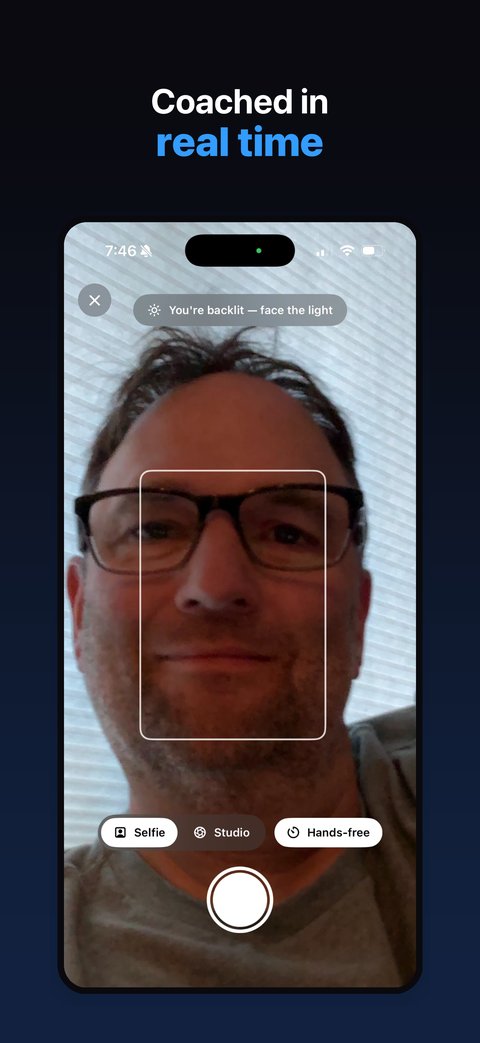
Headshot Studio helps a user take a real professional-looking photo of themselves instead of generating a synthetic face. The app coaches framing, lighting, and distance during the shoot, supports hands-free capture, and lets the user review and keep the photos they actually took.
Published · 3 Paws product case study
At a glance
- Product
- Headshot Studio
- Platform
- iPhone
- Role
- Product design, iOS development, release, and ongoing product ownership by 3 Paws AI Studio
- Focus
- Camera UX, real-time guidance, on-device processing, export flows, optional cloud image processing, privacy
- Built with
- SwiftUI, SwiftData, AVFoundation, Vision, Core Image, StoreKit; Studio Retouch runs on a Cloudflare Workers backend calling an OpenAI image model
- Business model
- Free to shoot and review; one-time US$12.99 Studio Pro unlock to save and export
The product challenge
A professional headshot is not primarily a “generate an image” problem. Most people already have a capable camera in their pocket; the harder problem is helping them use it well when no photographer is standing behind the phone.
The experience needed to provide useful guidance while someone was actively positioning themselves, avoid making the capture flow cumbersome, and preserve a clear boundary between on-device camera coaching and the optional processing that requires a remote service.
The approach
Headshot Studio treats the phone as a guided photo booth. During capture, it provides feedback on framing, lighting, and distance. Users can trigger a shot hands-free with their voice or use the manual shutter, review their results, choose favorites, and export them in LinkedIn, portrait, and original formats after unlocking Studio Pro, which also adds studio backdrop replacement.
For users who choose Studio Retouch, two favourite shots enter a separate opt-in flow that blends them into one polished headshot. The product makes the boundary explicit: live camera coaching stays on the phone; only the photos the user deliberately selects for retouching are sent to a Cloudflare Workers backend that calls an OpenAI image model, and 3 Paws does not store the uploaded photos.

What the work demonstrates
Camera-first interaction design
Building around a live camera session where guidance must be useful without getting in the user's way.
Real-time on-device feedback
Turning framing, lighting, and distance signals into understandable guidance during capture.
Hands-free workflow design
Supporting a user who may be standing away from the phone rather than holding it.
Local and cloud boundaries
Separating on-device functionality from an optional remote image-processing feature and communicating that boundary clearly.
Paid product execution
Combining a free-use experience with a one-time paid unlock and optional follow-on purchases.
Shipped outcome
Headshot Studio is a live App Store product, not a concept demo. It demonstrates the ability to take a camera-heavy mobile idea through interaction design, device processing, optional cloud integration, privacy decisions, monetization, and App Store delivery.
Building a camera, media, or AI-assisted iPhone experience?
3 Paws can join an existing team or take on a focused iOS delivery sprint.